
Upload your photo
JPG, PNG or WEBP up to 10 MB. Use a clear front-facing photo with a plain light background.
Make a passport-style photo sheet for Indian document work
Use this page when you need one flexible passport photo maker for form uploads, local printing, photocopy shop work, student documents, job applications and ID card records.
What this tool prepares
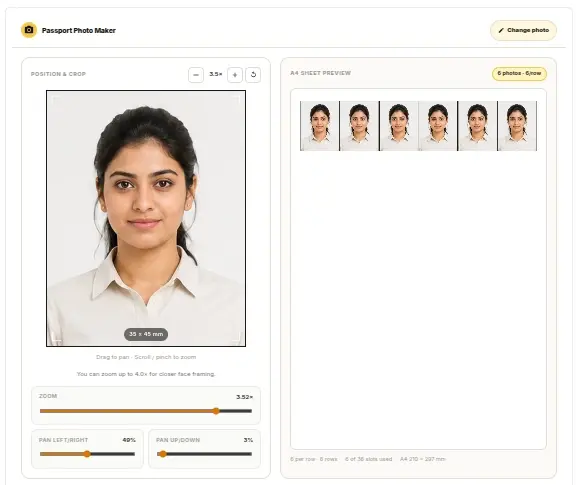
Crop one photo, choose a passport-style size, build a printable sheet, add name/date only when required and export the final file in JPG, PNG or PDF.
35x45 mm ready
Useful for common Indian passport-style and document photo work.
A4 sheet output
Prepare multiple photo copies on one printable sheet.
Name and date option
Add text only for student, exam, job or office forms that ask for it.
Privacy and upload note
- Your image is processed in your browser when supported. We do not ask for OTP or government login details.
- Always check the official portal requirement for dimensions, KB size, background and file format before final upload.
- This tool helps prepare the file, but final acceptance depends on the portal or department rules.
Portal par upload karne se pehle final file ko ek baar check karein.
Quick steps
- 1
Choose a recent image with clear face visibility, even light and enough space around the head.
- 2
Select 35 x 45 mm, 51 x 51 mm or another available preset based on the form or print requirement.
- 3
Move and zoom the photo until the face, shoulders and background look clean inside the crop frame.
- 4
Choose the number of photos, spacing and sheet layout before downloading the final file.
- 5
Use PDF for direct printing and JPG or PNG when you need to share the file with a shop or another tool.
Passport Size Photo Maker FAQs
Clear answers for file preparation, printing, uploads and common document requirements.
What can I make with this passport size photo maker?
You can upload one photo, crop it to a passport-style size, arrange repeated copies on a printable sheet and download the result as JPG, PNG or PDF.
Is this page for Indian document work?
Yes. The content and presets are written for common Indian document tasks such as school forms, college records, job applications, ID cards, local office files and photocopy shop printing.
Does it support 35 x 45 mm photos?
Yes. Use the 35 x 45 mm passport-style preset when your print task or form asks for that size. Always check the final instructions on the destination form before submission.
Can I prepare a 630 x 810 pixel passport photo here?
This page explains the 35 x 45 mm and 630 x 810 pixel relationship for Indian passport-style photo searches. If your portal needs an exact pixel size or KB limit, crop here first and then use the photo resizer if needed.
Can I make an A4 passport photo sheet?
Yes. The tool can arrange repeated passport-style photos on an A4 sheet for home printing or shop printing.
Can I add name and date to the photo?
Yes. Add name or date only when the form, school, exam, job application or office record asks for it. Keep the photo plain for official submissions that do not allow extra text.
Should I download PDF, JPG or PNG?
Choose PDF for direct printing. Choose JPG or PNG when you want to share the file with a print shop, save it with other documents or continue editing in another tool.
Will every official portal accept the final photo?
Acceptance depends on the latest rules of the portal or office. Check size, pixels, background, face position, file type, file size and photo age before final upload or print submission.
Kaise kare
How to make a passport size photo online
Start with the tool at the top of the page, then follow this practical flow for Indian document work. The goal is to create a clean passport-style photo sheet without using complex editing software.
Upload a clear face photo
Choose a recent front-facing image with even light, visible shoulders and enough space around the head for cropping.
Select a useful size
Use 35 x 45 mm, 51 x 51 mm or another available passport-style preset depending on the form or print requirement.
Preview before export
Check the crop, spacing, repeated copies and optional name/date text before saving the final sheet.
Save for print or sharing
Use PDF for direct printing and JPG or PNG when sharing with a photocopy shop or storing with other documents.
Passport photo quality and official-form checks
Before you download
- Use a recent and sharp front-facing photo.
- Keep the face evenly lit without strong shadows.
- Use a plain or white background when the form asks for it.
- Avoid filters, sunglasses, heavy editing and tilted head position.
- Check whether the form needs print size, pixel size, KB size or a specific file format.
Important note for official submissions
This tool helps prepare passport-style photos and printable sheets. Passport, visa, Aadhaar, PAN, job, admission and KYC portals can have different rules, so verify the latest official instructions before upload or submission.
Passport photo maker for Indian forms and printing
Photocopywala is built around the document tasks people handle every day in India: admission forms, job applications, ID cards, office records, certificates, local photocopy shop printing and PDF document files. The page keeps the photo maker first so users can finish the task quickly and read guidance only when needed.
Video tutorial
Watch the A4 passport photo sheet tutorial
Watch the Photocopywala YouTube guide to see how to make passport-size photos on an A4 sheet before downloading or printing your file.
35 x 45 mm, 51 x 51 mm and 630 x 810 pixel guidance
Many users search for 35 x 45 mm passport photos, 51 x 51 mm square photos and 630 x 810 pixel passport-style output. These requirements are not always interchangeable. Use this page for cropping and sheet preparation, then check the exact instruction of the portal or office before final submission.
पासपोर्ट साइज फोटो ऑनलाइन बनाएं
Photocopywala पर आप पासपोर्ट साइज फोटो ऑनलाइन बना सकते हैं। फोटो अपलोड करें, जरूरत के हिसाब से साइज चुनें, A4 शीट तैयार करें और JPG, PNG या PDF डाउनलोड करें।
Need help before choosing a passport photo tool?
Read the step-by-step guide if you want to understand photo quality, size selection, cropping, A4 printing and download formats before creating the final file. You can also compare popular passport photo tools if you are still deciding which workflow fits your task.
Choose the exact passport photo task
Use the main tool for general work, or open a focused page when the requirement is very specific. This keeps each task clear and avoids mixing different photo needs on one page.
Common mistakes
Too much compression
Very small KB targets can make faces, signatures or document text unclear.
Wrong dimensions
Many portals reject files when the KB is correct but pixel size or aspect ratio is wrong.
Skipping the final check
Open the final file once before upload so you catch blurry output or the wrong format.
Using portal-unapproved backgrounds
Some forms need white or plain backgrounds, even if the photo size is correct.
Related passport photo tools
35x45 mm Photo Maker
Use the exact-size page when your form or print task clearly asks for a 35 x 45 mm passport-style photo.
Open 35x45 mm Photo MakerA4 Passport Photo Sheet Maker
Create a print-focused A4 sheet when you need multiple passport photo copies for cutting and reuse.
Open A4 Passport Photo Sheet MakerPassport Photo with Name and Date
Prepare photos for student, exam, job or office forms that specifically need name/date text on the photo.
Open Passport Photo with Name and DateResize Photo for Online Form Upload
Use this after cropping when the portal asks for a specific pixel size, KB limit or file format.
Open Resize Photo for Online Form UploadCrop Photo Before Making Passport Size Photo
Clean up framing first if your original photo has extra space, tilted framing or uneven composition.
Open Crop Photo Before Making Passport Size PhotoConvert Photo and Documents to PDF
Convert scanned documents, certificates, ID proofs and prepared photo sheets into a PDF file.
Open Convert Photo and Documents to PDFOnline help
Need help preparing this file?
If your photo, signature, PDF, or document is still not accepted on a portal, send your requirement on WhatsApp. We can help prepare the final file online.
We do not ask for OTP, passwords, Aadhaar login, MPOnline login or any government portal credentials.