
Notebook Page Maker: Create Handwritten Assignment Pages
Generate realistic assignment notebook pages in Hindi single ruled, English 4-line, Math graph grid, and double ruled styles. Type handwritten notes.
Launch Notebook Page Maker Tool
Open the full-screen interactive canvas workspace to start typing assignment pages, adjusting line height spacing, cropping diagrams, and downloading print-ready PDFs.
Quick Answer: What is PhotocopyWala Notebook Page Maker?
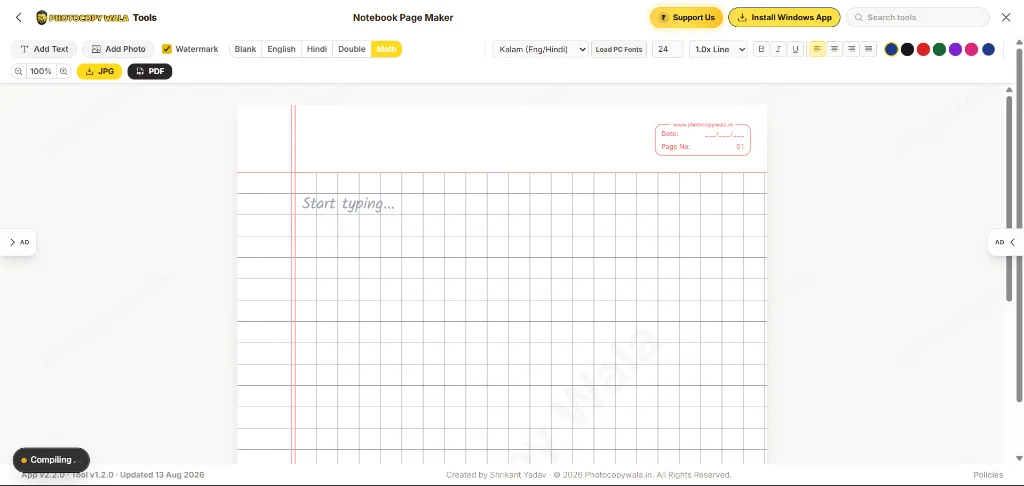
PhotocopyWala Notebook Page Maker is a 100% free web-based tool that creates realistic digital assignment paper sheets. It supports 5 notebook ruling patterns (Hindi Single Ruled 32px, English 4-Line 72px, Math Grid 32px, Double Ruled, and Blank), Google handwriting fonts (Kalam, Amita, Yatra One) + local computer fonts (Mangal, Kruti Dev 010), visual photo cropping, line height spacing controls (1.0x to 3.0x), and multi-page PDF/JPEG exports with -photocopywala file suffix.
Key Features & Core Capabilities
Everything built into Notebook Page Maker to make handwritten assignments 10X faster:
Switch seamlessly between Hindi single ruled (32px), English 4-line (72px block), Math graph grid (32px), double ruled, and blank canvas.
Crop uploaded diagrams, figures, or signatures visually with live dark mask overlays and Top/Bottom/Left/Right range controls.
Manage line spacing from 1.0x to 3.0x (double line spacing, 1.5x, etc.) so text lines sit perfectly on notebook ruling lines.
Supports Google Fonts (Kalam, Amita, Caveat) and system font scanning (`window.queryLocalFonts()`) for Mangal, Nirmala UI, and Kruti Dev 010.
Position text boxes and images with millimeter precision using Arrow keys (2px micro-movement) and Shift + Arrow keys (10px movement).
Export multi-page publication-ready documents without UI borders. All files automatically append -photocopywala filename suffix.
How to Create Handwritten Assignment Pages (4 Steps)
Step-by-step guide to generating realistic assignment notebook pages online:
Select Notebook Ruling Style
Choose your paper background pattern: Hindi Single Ruled (32px), English 4-Line (72px block), Math Grid, Double Ruled, or Blank Canvas.
Type Assignment Text & Select Font
Click Add Text, type your assignment content, select handwriting fonts (Kalam, Amita, Yatra One) or computer Hindi fonts (Mangal, Kruti Dev 010).
Upload, Crop & Nudge Photos
Upload diagrams or signatures. Click the Crop (✂️) button to trim borders visually, scale with corner handles, or nudge with Arrow keys.
Download Print-Ready PDF or JPEG
Click Download PDF or Download JPEG to export multi-page clean documents with your custom -photocopywala filename suffix.
Who Uses Notebook Page Maker?
Designed specifically for education, digital centers, and handwriting generation:
School & College Students
Create realistic handwritten school and college assignments, project notebook pages, practical file sheets, and homework submissions online without.
CSC VLEs & Cyber Cafes
Provide instant custom assignment page printouts for customers, draft handwritten application forms, and overlay customer photos onto ruled paper.
Teachers & Tutors
Generate Hindi and English handwriting practice worksheets, 4-line alphabet trace sheets, math grid test papers, and model handwritten solution notes.
Frequently Asked Questions (FAQs)
Common questions about ruling patterns, fonts, photo cropping, and exports:
How does the English 4-Line page alignment work?
Our tool uses a precise 72px 4-line pattern block (red-blue-blue-red guidelines). Every line of text automatically aligns to consecutive 4-line blocks with line-height math so letter ascenders and descenders sit perfectly on the guidelines without glyph clipping.
Can I use Hindi local PC fonts like Mangal, Nirmala UI, or Kruti Dev 010?
Yes! You can choose from pre-loaded Hindi system fonts, click 'Load PC Fonts' to scan all fonts installed on your computer, or type any font family name in the Custom Font dialog.
How do I crop uploaded photos before placing them on the notebook page?
Click on any uploaded photo to reveal its floating toolbar, then click the Crop (✂️) button. A visual cropping modal will open allowing you to adjust Top, Bottom, Left, and Right crop margins with live preview.
How do I adjust the line height spacing between text lines?
Use the Line Height selector in the top toolbar or on the selected text box toolbar. You can select 1.0x (default), 1.25x, 1.5x (1.5 lines), 2.0x (double line spacing), 2.5x, or 3.0x (triple line spacing).
Are my uploaded photos and handwritten notes saved on a server?
No. Everything is processed 100% locally in your web browser memory. Your documents and uploaded images are private and never transmitted to any external server.
What format will my downloaded file be in?
You can export your document as high-DPI JPEGs or a multi-page PDF document. All files automatically append the '-photocopywala' suffix (e.g. notebook-assignment-photocopywala.pdf).
Ready to create your assignment page?
Launch the interactive tool now to start typing handwritten notes, cropping images, and downloading high-DPI PDFs.