
Smart E-PAN to PAN Card ID Maker
Convert official NSDL & UTIITSL e-PAN digital PDFs into perfectly aligned dual-sided CR-80 PVC plastic cards and printable A4 sheets at crystal-clear 300 DPI.
Convert e-PAN PDF to PVC & A4 Print Sheet
Upload your official NSDL or UTIITSL e-PAN PDF file, crop front & back card faces, and export 300 DPI high-resolution PDF or JPG print sheets instantly.
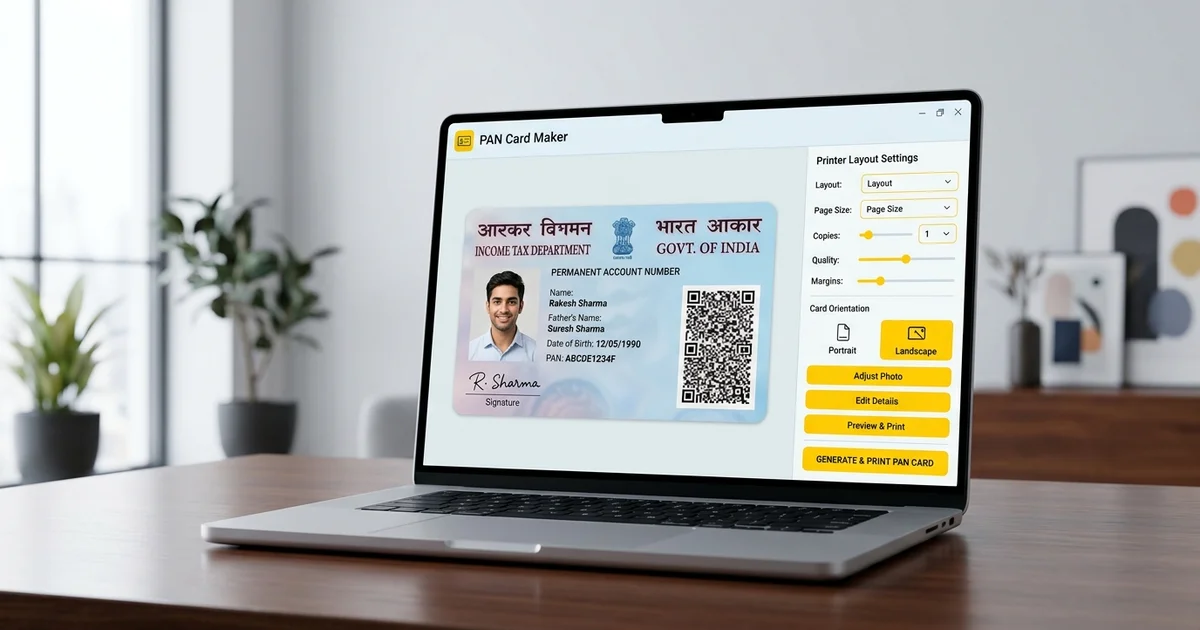
How to Convert e-PAN PDF to Printable PAN Card
Follow these 5 simple steps to generate a professional print sheet:
1. Download Official e-PAN PDF
Download your digital e-PAN PDF from Protean NSDL, UTIITSL, or the Income Tax e-Filing portal.
2. Upload to Smart PAN Tool
Select your e-PAN PDF in our workspace. Enter your Date of Birth (DDMMYYYY) if prompted for a password.
3. Auto-Crop Front & Back Faces
The tool automatically detects and isolates the front (photo/signature) and back card sections to CR-80 size.
4. Select Sheet Layout & Border
Choose between single PVC card, A6 single cut, or multi-card A4 sheets with cutting guidelines.
5. Download 300 DPI Print Sheet
Export high-resolution 300 DPI PDF or JPEG files with zero watermarks for clean printing.
Quick answer
Printing full-page e-PAN PDFs on paper leaves large blank margins and produces non-standard cards that cannot fit in wallets or cardholders.
Photocopywala Smart PAN Card Maker extracts the official PAN card portion from your e-PAN PDF, crops both front and back faces to standard CR-80 dimensions (85.6 × 53.98 mm), and prepares print-ready A4 sheets (up to 5 cards per page) or 4×6 photo sheets at sharp 300 DPI. The tool runs 100% locally in your browser memory with zero file uploads, keeping your financial identity completely private.
Why Use Photocopywala Smart PAN Card Maker?
Engineered specifically for cyber cafes, CSC kiosks, printing counters, and citizens across India.
Exact CR-80 Card Size
Formats front and back faces to official 85.6 × 53.98 mm dimensions matching bank ATM and Aadhaar cards.
Auto Password Unlock
Seamlessly unlocks encrypted e-PAN PDFs using your Date of Birth in DDMMYYYY format without manual hassle.
PAN Privacy Masking
Optionally mask your middle PAN Number characters (e.g. ABCDE1234F → ABXXXX34F) before sharing copies for KYC verification.
Smart PAN Card Print Specifications
Standardized physical dimensions and print resolutions for Indian Permanent Account Number (PAN) Cards:
| Print Format | Physical Size | Resolution / Canvas | Target Printing Hardware |
|---|---|---|---|
| Standard CR-80 PVC Card | 85.6 × 53.98 mm (3.37 × 2.125 in) | 1012 × 638 px (300 DPI) | Thermal PVC Card Printers (Evolis, Zebra, Magicard) |
| A4 Multi-Card Print Layout | 210 × 297 mm (Standard A4 Paper) | Up to 5 dual-sided cards per sheet | Inkjet / Laser Color Printers (Epson, Canon, HP) |
| A6 Single Card Cut Layout | 105 × 148 mm (4 × 6 Photo Paper) | Front & back paired side-by-side | Compact Photo Printers & Studio Printing |
Print Setting Tip: Always set your printer scaling to "Actual Size" or 100% in the print dialog. Avoid "Fit to Page" or "Shrink to Printable Area", which will shrink your card by 5-8%.
Comparing PAN Card Printing Methods
Cost, durability, and equipment comparison for creating physical PAN cards:
| Material & Method | Estimated Cost | Durability Level | Equipment Required |
|---|---|---|---|
| Glossy Photo Paper + 250μ Lamination | ₹5 - ₹10 per card | High (Water & scratch resistant) | Any Inkjet Printer + Pouch Laminator |
| Direct Thermal PVC Card | ₹25 - ₹50 per card | Ultra High (Permanent plastic card) | Dedicated Thermal PVC Card Printer |
| Plain Bond Paper (75-80 GSM) | ₹2 - ₹3 per page | Low (Temporary paper submission only) | Standard Office / B&W Laser Printer |
Common e-PAN Conversion Issues & Solutions
Quick fixes for common issues encountered during PAN card processing:
Password Error on Upload
Official e-PAN PDFs use your Date of Birth in DDMMYYYY format (e.g. 01011995 for 1 Jan 1995) without slashes or spaces. For company PANs, use Date of Incorporation.
Blurry or Pixelated Output
Ensure you upload the original vector PDF file downloaded from NSDL/UTIITSL rather than a mobile photo or screenshot.
Card Printed Too Small / Large
In your PDF reader or browser print dialog, choose 'Page Scaling: None' or '100% Actual Size' to preserve physical 85.6 × 53.98 mm dimensions.
Front and Back Inversion
Use the 'Swap Front/Back' button in the toolbar before exporting if your PDF has non-standard panel layout.
Income Tax Department Legal Validity
Official legal status of digital e-PAN printouts under Indian tax laws:
According to the Income Tax Department (ITD) notification and Rule 114 of Income Tax Rules, 1962, an e-PAN generated with QR code is completely equivalent to a physical PAN card issued by NSDL/UTIITSL.
Printed and laminated e-PAN cards are accepted by all Indian banks, financial institutions, government portals, EPFO, and passport offices for KYC and identity verification.
Client-Side Private Memory Sandbox
Your personal financial identity document is 100% protected with zero cloud exposure:
Zero Cloud Uploads
All PDF decryption, image extraction, and 300 DPI canvas rendering run entirely inside your browser's local sandbox memory.
No Database Storage
No personal PAN records, names, Father's names, or PAN numbers are ever logged, cached, or transmitted to any server.
Instant Session Purge
All document buffers and temporary canvas objects are instantly purged when you close or refresh your browser tab.
Clean Watermark-Free Export
Exports professional, high-resolution PDFs and JPEGs without any third-party ads, logos, or watermarks superimposed on your card.
Best Practices for Cyber Cafes & Home Printing
Actionable tips for achieving crisp, durable PAN Card prints:
A4 Photo Paper Printing
Print on 180-230 GSM glossy photo paper and laminate with 250-micron pouches for durable pocket ID cards.
Direct PVC Card Printing
Use the Single PVC option to feed blank CR-80 PVC cards directly into thermal card printers (Evolis, Zebra, Badgy).
Black Border Alignment
Keep 1px Black Border enabled to provide clear guidelines for precise scissor or die-cutter trimming.
Privacy Masking for Photocopies
Use the privacy mask feature when uploading PAN card copies for temporary verification forms or hotel check-ins.
Frequently Asked Questions
How do I convert NSDL / UTIITSL e-PAN PDF into a physical PVC PAN card?
Upload your original NSDL/Protean or UTIITSL e-PAN PDF. Our tool opens the file, renders it at 300 DPI high resolution, crops the front and back card faces to CR-80 physical dimensions (85.6 × 53.98 mm), and generates clean A4 or PVC print layouts ready for printing.
What is the password format to open e-PAN card PDF files?
The standard password for opening e-PAN PDFs downloaded from NSDL/Protean, UTIITSL, or the Income Tax e-filing portal is your Date of Birth or Date of Incorporation in DDMMYYYY format (e.g. 01011995 for 1st Jan 1995) without slashes or hyphens.
Is a printed e-PAN card legally valid for official and banking purposes in India?
Yes. Under Rule 114 of the Income Tax Rules, 1962, an e-PAN card downloaded from authorized portals (NSDL/UTIITSL/Income Tax) carries the same legal validity as a physical plastic PAN card dispatched by post, when presented for banking, KYC, and financial transactions.
What are the exact dimensions and pixel resolution of a standard PAN Card?
A standard Indian PAN Card follows the international CR-80 (ID-1) standard measuring 85.6 mm in width by 53.98 mm in height. At 300 DPI print quality, this corresponds to exactly 1012 × 638 pixels per side.
Which paper and lamination method give the most durable PAN Card result?
For inkjet printing, print on 180-230 GSM glossy photo paper and encase inside a 250-micron hot lamination pouch. For permanent plastic finish, print on thermal CR-80 PVC cards using a dedicated card printer.
Can I print multiple PAN Cards on a single A4 sheet for my cyber cafe or shop?
Yes. The tool features multi-card A4 sheet layouts enabling you to print up to 5 dual-sided PAN cards on a single sheet with cutting borders, saving costly photo paper and lamination sheets.
Can I mask my PAN Number for privacy before sharing for KYC or proof?
Yes. The tool provides a one-click Privacy Mask toggle that hides your middle PAN characters (e.g. ABCDE1234F → ABXXXX34F) to safeguard your financial privacy while sharing photocopies.
Are my personal financial details or PAN documents uploaded to any server?
No. All PDF loading, password decryption, cropping, and 300 DPI image generation run 100% locally inside your web browser memory. Zero files or PAN records are ever uploaded to cloud servers.