
Passport Size Photo Maker Online Free - 35x45mm & A4 Sheet
Create official passport size photos online for Indian government forms, entrance exams, and ID cards. Print 5-36 photos on an A4 sheet or choose A6 and 4x6 layouts. Crop to standard 35x45mm (3.5x4.5cm), remove backgrounds cleanly to plain white, and prepare print-ready files in minutes.
Make Passport Size Photo Online in Seconds
No sign-up required. Choose your document format, crop your photo, and download print-ready files instantly.

Standard Indian Passport Size Photo
35 mm width x 45 mm height | 3.5 cm x 4.5 cm | 413 x 531 px at 300 DPI
Official Biometric Standards with In-Browser Privacy
A dedicated client-side utility built to prevent portal rejection, inaccurate dimensions, and paper wastage without server uploads.
When candidates and families prepare application forms in India, formatting the passport photograph is often the most stressful hurdle. Major recruitment portals such as SSC, UPSC, NTA NEET, IBPS, and state police recruitment boards enforce strict biometric upload gates. If a photo has improper pixel ratios, uneven lighting, a cluttered background, or exceeds strict 20 KB to 50 KB file limits, the portal rejects it instantly or cancels the application during document verification.
Traditional mobile photo editing apps are not designed for official documents. They often apply automatic facial smoothing, skin lightening, or artificial jawline narrowing, which biometric scanners and examination centers flag as identity tampering. Furthermore, many commercial websites charge fees or secretly upload personal photos to third-party cloud servers.
Photocopywala was created to deliver an authentic, transparent, and completely free document utility. Operating with the practical accountability of a dedicated document desk, our tool allows you to crop your authentic camera capture to exact 35x45mm (3.5x4.5cm) dimensions, center your face within official 70% to 80% biometric guides, set a compliant plain white or off-white background, and optionally add candidate name and photo capture date (DOP) strips.
The tool runs 100% inside your device web browser using client-side HTML5 Canvas technology. Your photograph is never uploaded to any remote server or stored in any database. Whether you need a single compressed JPG under 50 KB for an online portal or an A4/4x6 multi-photo sheet with cutting margins for physical printing, our tool generates exact millimeter-scale files in seconds.
Official Size Reference (2026)
Exact mm, cm, inches, and 300 DPI pixels across all Indian forms.
Compliance RulesNew Passport Photo Rules
Facial guidelines, background rules, and how to avoid portal rejection.
Photography TipsTake Photo at Home on Phone
Lighting, posture, camera angle, and background tips using any smartphone.
Step TutorialMake Photo Online Guide
Complete walkthrough on cropping, setting margins, and printing sheets.
Designed for Exam Candidates, Cyber Cafes, and Families
Whether preparing a single 50KB upload or printing bulk A4 sheets, each workflow addresses real-world document needs.
Students & Competitive Exam Applicants
UPSC, SSC, Banking, Railways & NTA ExamsApplicants preparing for SSC CGL, CHSL, MTS, GD, UPSC Civil Services, IBPS Bank Clerk/PO, Railway RRB, and NEET require exact 35x45mm dimensions, strict 20 KB to 50 KB file sizes, and often a Candidate Name and Date of Photo (DOP) strip. Our tool formats these in seconds without distorting facial biometric data.
Cyber Cafe Operators & CSC VLE Centers
High-Volume Digital Seva & Print DesksCyber cafes and Common Service Centers handle dozens of form submissions daily. Rather than waiting for heavy Photoshop actions to process or paying software subscriptions, operators can load a customer photo, choose an A4 sheet (25 to 36 photos) or 4x6 sheet (8 photos), and print instantly with clean scissor cut borders.
Job Seekers & Working Professionals
Resumes, Company ID Badges & ApprenticeshipsWhen applying for private corporate jobs, apprenticeship portals, or preparing employee ID badges, applicants need clean, formal, professional passport photos with crisp solid white backgrounds. Our tool exports uncompressed, high-resolution portrait files without watermarks.
Families & Everyday Citizens
Passports, Driving Licences & Family DocumentsFamilies needing photos for school admissions, voter IDs, Sarathi Parivahan driving licences, or passport renewals can prepare their photos from home. Using our multi-photo layout, you can arrange photos of different family members on a single 4x6 sheet and print it at any local studio for just ₹5 to ₹10.
Official Indian Passport Photo Dimensions in mm, cm, Inches & Pixels
The official standard Indian passport size photo is 35 x 45 mm. Every measurement below represents the exact same physical photo expressed across different measurement units and print resolutions.
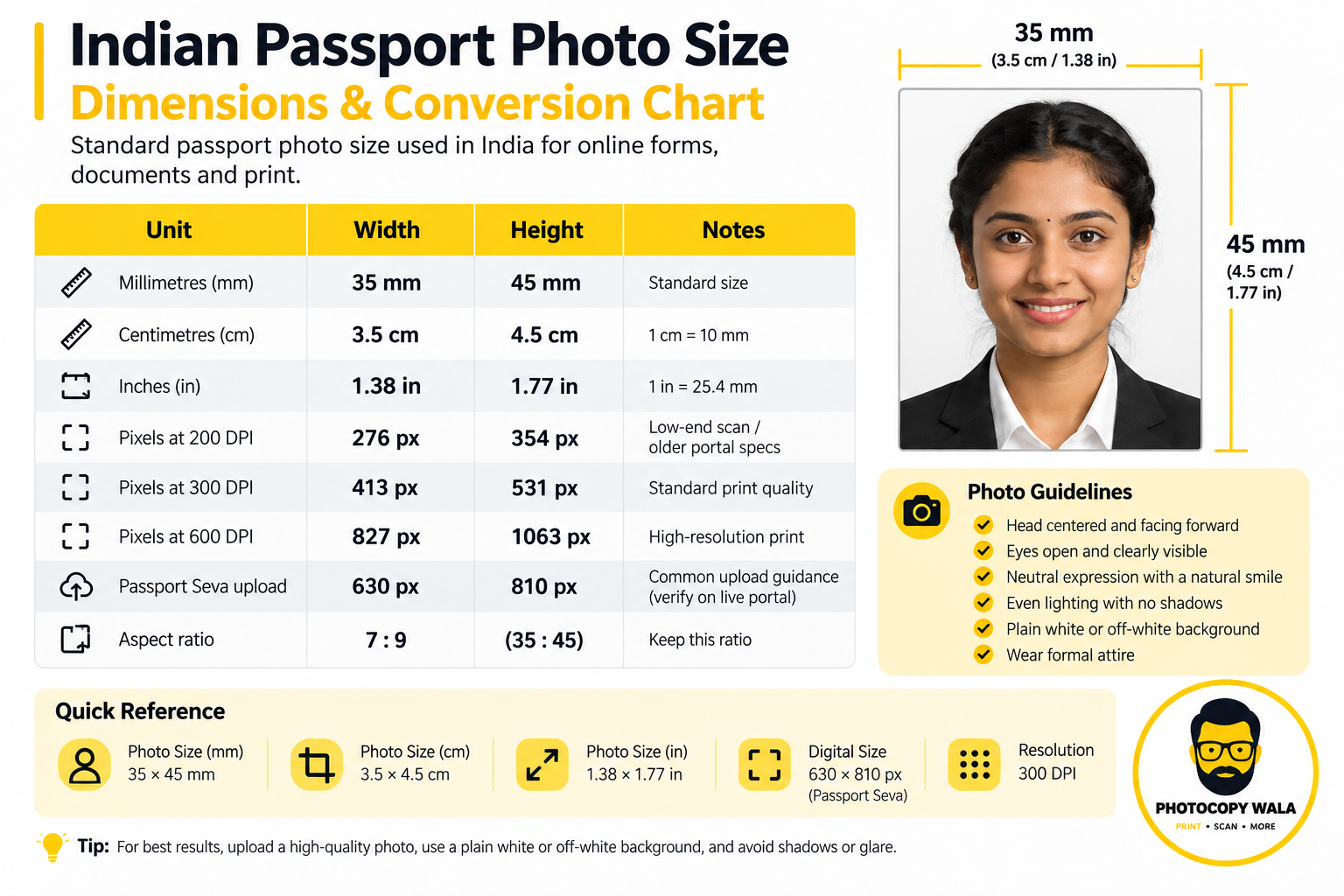
| Measurement Unit | Passport Size Value | Application Context |
|---|---|---|
| Millimetres (mm) | 35 × 45 mm | The number most Indian forms print |
| Centimetres (cm) | 3.5 × 4.5 cm | Same size, written differently |
| Inches | 1.38 × 1.77 in | Rounded from 35 mm and 45 mm |
| Pixels at 200 DPI | 276 × 354 px | Low-end scan / older portal specs |
| Pixels at 300 DPI | 413 × 531 px | Standard print quality |
| Pixels at 600 DPI | 827 × 1063 px | High-resolution print, large file |
| Passport Seva upload | 630 × 810 px | Common upload guidance - verify on the live portal |
| Aspect ratio | 7 : 9 (35 : 45) | Keep this and every size above scales correctly |
Two Things Almost Every Other Page Gets Wrong
1. Aadhaar does not have an online photo upload: Your Aadhaar photograph is captured live at an authorized UIDAI enrolment or update centre. There is no field anywhere on the myAadhaar portal to upload a digital passport photo file. If you are submitting a physical paper enrolment or correction form at the center, you only need an ordinary printed 35 x 45 mm photo.
2. Passport Seva is not 2 x 2 inches: The square 51 x 51 mm (2 x 2 inch) format belongs exclusively to OCI cards, Indian visas, and US passports. A domestic Passport Seva application submitted inside India requires a rectangular 35 x 45 mm portrait photo (typically 630 x 810 pixels as a JPEG under 250 KB). Preparing the wrong shape leads to portal rejection.
Pixel figures are calculated mathematically from 35 mm and 45 mm at 300 DPI. Always verify any portal-specific restrictions on the live application form. Specifications on this page were last checked on 23 July 2026. Portal rules change without notice - confirm on the live form before you submit.
4 Steps to Format, Crop, and Print Your Passport Photo
Follow these straightforward steps to prepare a biometric-compliant portrait or printable sheet in under one minute.
Upload Authentic Photo
Take a front-facing selfie or portrait in natural daylight and upload it. Avoid beauty filters to ensure facial biometrics remain 100% authentic.
Crop to 35x45mm
Align chin and eyes within the biometric oval guide. Ensure your face occupies 70% to 80% of the standard 35x45mm (7:9 aspect ratio) frame.
Set Background & DOP
Switch background to plain white or light off-white. If required by exam notifications, toggle Candidate Name & Date of Photo (DOP) bar.
Download Print File
Export single JPG under 50 KB for online portal uploads, or download 100% scale A4/4x6 sheet PDF in portrait or landscape for studio printing.
Before / After: Mobile Selfie to Official Passport Size Photo
Drag the slider to see how our online editor cleans casual backgrounds to solid white, aligns the face within biometric guidelines, and formats exact 35x45mm dimensions.

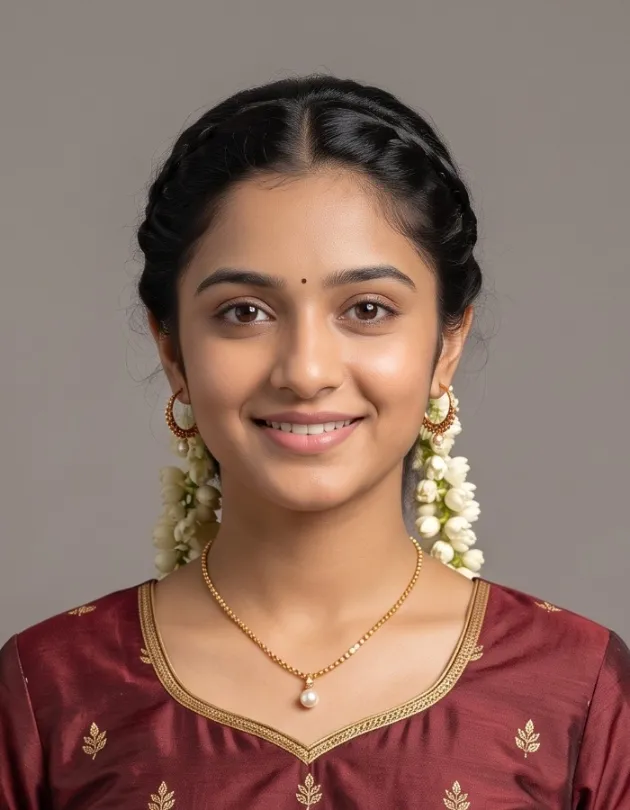
Drag the slider to compare raw photo vs final compliant passport photo
- ✓Natural Original Features: Real skin texture, true eye color, and natural facial contours without beauty filters.
- ✓Direct Frontal View: Facing the camera squarely with both ears visible and a relaxed, neutral expression.
- ✓Even Daylight: Soft natural light on both sides of the face without sharp flash glare or dark under-chin shadows.
- ✗AI Beautification & Face Smoothing: Exam portals (SSC, UPSC, NTA) flag artificial face altering as biometric impersonation.
- ✗Generative AI Avatars: Synthetic lighting, altered jawlines, and AI-painted hair trigger rejection during physical verification.
- ✗100% Browser Protection: Our tool never modifies your face - it only crops and formats your authentic original photo.
Printing on A4 vs 4x6 / A6 Paper: How to Configure 5 or 6 Photos in a Row
Learn paper sheet differences, photo lab paper standards, and how to configure 5 or 6 photos in a row on an A4 sheet for scissors or guillotine cutters.
4x6 Inch / A6 Paper (10 x 15 cm) - Studio Paper Standard
Standard 4x6 inch (4R / 102 x 152 mm) glossy photo paper is the universal format supported by all photo printers, mini-labs, and cyber cafes. It fits 6 to 8 photos perfectly without requiring a full desktop printer, making it ideal when you need a compact batch of physical photos for a single exam or ID application.
- 6 to 8 Photos per Sheet: Arranged in 2 rows of 4 or 2 rows of 3 with built-in cutting margins.
- Compact Batch: Ideal when you only need a handful of physical copies without handling a large sheet.
Standard A4 Paper (210 x 297 mm) - Bulk Printing Standard
Standard A4 paper is available in every office, home inkjet printer, and photocopy center. When you need 25, 30, or up to 36 copies for multiple entrance exams, school admissions, or family document verifications, an A4 photo sheet delivers maximum efficiency and print output.
- 25 to 36 Photos per Sheet: Configurable 5 or 6 in a row layouts to match your cutting method.
- 100% PDF Scale Lock: Preserves exact millimeter dimensions without printer auto-shrink errors.
How to Configure 5 or 6 Photos in a Row in the Tool Settings
On an A4 sheet (210 mm width), our tool specifically supports 5 photos in a row or 6 photos in a row presets depending on your cutting method:
25 to 30 Photos (Comfortable Scissor Cutting)
Layout: 5 columns x 5 rows (25 photos) or 5 columns x 6 rows (30 photos). 5 photos at 35 mm width take 175 mm, leaving 35 mm on an A4 sheet (210 mm width) for generous 10 mm side margins and ~3 mm cutting gutters.
Best for: Home inkjet printing, manual scissor cutting, and cyber cafes where comfortable spacing prevents clipping adjacent photos.
30 to 36 Photos (Tight Hairline Guides)
Layout: 6 columns x 5 rows (30 photos) or 6 columns x 6 rows (36 photos). 6 photos at 35 mm width span 210 mm with minimal margins and narrow 1.5 mm to 2 mm hairline blade guides.
Best for: Maximum paper efficiency and commercial print shops using a rotary trimmer or guillotine blade for rapid, straight parallel cuts.
Print Sheet Capacity by Paper Size & Spacing
| Paper Format | Comfortable (Scissors) | Maximum (Guillotine) | Recommended Use Case |
|---|---|---|---|
| A4 (210 × 297 mm) | 20 photos (4 across × 5 down) | Around 24-30 at very tight spacing | Bulk printing for a whole family or a shop counter |
| A4, spaced for easy cutting | 12 photos (3 across × 4 down) | 16 | Home printing with scissors instead of a paper cutter |
| 4 × 6 inch (102 × 152 mm) | 6 photos (2 across × 3 down) | 8 | Cheapest option at a local photo lab |
| A6 / postcard | 4 photos | 6 | When you only need a couple of copies |
5 Critical Rules for Printing Passport Photos at Exact Size
- Download the sheet as PDF: PDF format carries exact physical millimeter print dimensions; raw JPG files leave scaling up to printer software.
- Set print scale to Actual Size or 100%: Never select 'Fit to Page' or 'Shrink to Printable Area', as printers will silently shrink a 35 mm photo down to about 32 mm, triggering rejection.
- Use 180 to 230 GSM photo paper: Never use ordinary 75 GSM copier paper for form submissions; thin paper wrinkles, bleeds ink, and curls over time.
- Give the cyber cafe the PDF directly: Instruct the shop operator to print directly from Adobe Acrobat or browser print at 100% scale without re-cropping in Photoshop.
- Test cut one photo first: Always cut out a single photo and verify with a physical ruler (35 mm width by 45 mm height) before trimming the entire sheet.
How to Add Name and Date of Photo (DOP) on Passport Size Photo
Understand why SSC, UPSC, and State Police recruitment boards mandate candidate name and capture date strips, and how to configure them in the tool.
Why Exam Boards Mandate Candidate Name & Date of Photo
Major Indian examination boards (including SSC CGL, CHSL, GD, MTS, UPSC, UP Police, MP Police, Rajasthan Police, and Railway RRB) strictly require that applicant photos feature the candidate full name and the date of photo capture (DOP) clearly printed at the bottom.
- Recent Photo Verification: Proves the photo was taken within 10 to 90 days of the notification release date, preventing submission of outdated photos.
- Impersonation Prevention: Ensures the applicant identity matches the admit card and document verification records.
- Top Rejection Cause: Uploading a plain photo when the notification mandates a date strip leads to immediate rejection during initial scrutiny.
How to Configure Name & Date in Photocopywala Tool:
- In the tool settings panel, toggle Candidate Name & Date (DOP) to ON.
- Type your full candidate name in CAPITAL LETTERS exactly matching your 10th mark sheet.
- Select the Date of Photo using the calendar picker (ensure it is after the notification date).
- The editor automatically generates a 15% height crisp white footer bar with bold black typography, preserving biometric face proportions.
Passport Photo with Name and Date Tool
Instant name and date overlay with standard DD/MM/YYYY formatting, automatic font scaling, and instant 20 KB to 50 KB JPG export tailored for SSC, UPSC, and state police recruitment portals.
ROHIT SHARMA
DOP: 14/10/2026
Dedicated Tools for Specific Passport Photo Requirements
Choose specialized workflows tailored for single uploads, group family printing, or official exam formats without duplicate pages.
Single Passport Photo on A4 & Digital Upload
Most online exam forms (UPSC, SSC, IBPS, NEET) require uploading exactly one single digital image between 20 KB and 50 KB. When you do not need an entire sheet of photos, this tool generates a standalone compliant JPG file or prints a single photo centered on an A4 page.
Export standalone 35x45mm digital photos with instant 20 KB to 50 KB compression.
Multiple Passport Photo Making for Families & Groups
Unlike traditional tools that only duplicate a single portrait, our multiple photo editor allows uploading and printing different individuals (family members, siblings, or students) on the same 4x6 or A4 sheet to eliminate wasted photo paper.
Arrange up to 8 different photos on 4x6 paper or up to 36 distinct portraits on A4 sheets.
Mobile Passport Photo Maker (No App Needed)
Prefer editing directly on your smartphone? Our dedicated mobile passport photo maker is optimized for touchscreens. Pinch to zoom, reposition with your fingers, crop to standard 35x45mm, and download print-ready files right in your mobile browser without installing any heavy app.
Touch-friendly mobile interface with instant camera capture and 20KB to 50KB compression.
Indian Exam & Government Portal Photo Requirements
Verify the specific file size, dimensions, and photo guidelines for your recruitment application.
| Document / Exam Portal | Required Dimensions | File Format & Size | Background | Important Board Instruction |
|---|---|---|---|---|
| Indian Passport - Passport Seva online upload | 35 × 45 mm portrait | JPEG, commonly 630 × 810 px and under 250 KB - verify live | Plain white | Remove glasses when the current instruction asks for it. Keep the face clear and front-facing. |
| State government and local e-portal forms | Usually 35 × 45 mm (3.5 × 4.5 cm) | JPEG with the pixel and KB limit printed on the live form | Plain white or off-white | State portals vary. Treat the live notification or form instruction as final. |
| Police, Army & State Recruitment Exams | 35 × 45 mm | JPEG, 200 × 230 px or 350 × 450 px, 20-50 KB | Plain white | Tight file size caps such as 20-50 KB are common for online recruitment uploads. |
| OCI card / Indian visa / US visa | 51 × 51 mm (2 × 2 inch) square | JPEG, square crop | Plain white | Completely different shape from the Passport Seva upload - do not reuse the same file. |
| Aadhaar | No photo upload exists | - | - | Your Aadhaar photo is captured live at an enrolment or update centre. Any site selling you an 'Aadhaar passport photo size' is guessing. |
| PAN card - printed form | 3.5 × 2.5 cm on the older Form 49A layout | Two colour prints, affixed (not stapled) | White | PAN forms were revised recently and some current forms specify 4.5 × 3.5 cm. Read the size printed on the form in front of you. |
| PAN card - online (Protean/NSDL, UTIITSL) | Same proportion as the printed photo | JPEG, commonly under 50 KB | White or very light | The two portals differ. UTIITSL is usually the more permissive of the pair. |
| UPSC Civil Services | 35 × 45 mm, face roughly 75% of the frame | JPG, commonly 20-300 KB | Plain white | UPSC also wants a separate signature file, and in some cycles three stacked signatures. Check the current notification. |
| SSC (CGL, CHSL, MTS, GD) | 3.5 × 4.5 cm | JPEG, commonly 20-50 KB | White or very light | One of the tightest KB caps in Indian recruitment - compress carefully. |
| Railway RRB (NTPC, Group D) | 3.5 × 4.5 cm | JPEG, commonly 20-50 KB | White | Signature usually 10-20 KB as a separate file. |
| Banking (IBPS, SBI) | 200 × 230 px | JPEG, commonly 20-50 KB | White or very light | Specified in pixels rather than mm - resize by pixel value, not by print size. |
| NTA exams (NEET, JEE, UGC NET) | 35 × 45 mm | JPEG, commonly 10-200 KB | White | NEET has additionally asked for a postcard-size photo in past cycles. |
| Driving Licence (Sarathi Parivahan) | Passport-style portrait | JPEG, small cap - often 20 KB or less | White | Among the strictest file-size limits of any Indian portal. |
| School, college, office and ID card use | 35 × 45 mm printed | Printed on photo paper | Plain, usually white or light blue | No portal validator here - clarity after cutting matters more than exact KB. |
Where recruitment rules vary between notifications (such as UPSC or PAN portals), confirm the exact file limit on your live application portal before final submission. Specifications on this page were last checked on 23 July 2026. Portal rules change without notice - confirm on the live form before you submit.
Passport Size Photo KB Limits: 20KB, 50KB, 100KB & 250KB Guidelines
Understanding minimum and maximum file size restrictions on Indian recruitment and government portals.
| Target Size Band | Where You'll Meet It | Compression Advice |
|---|---|---|
| Under 20 KB | Sarathi driving licence, some state portals | Heavy compression. Check the face is still sharp before uploading. |
| 20 - 50 KB | SSC, RRB, IBPS, SBI, many state recruitment boards | The most common band in Indian recruitment. |
| 50 - 100 KB | PAN, several state government forms | Comfortable - quality loss is usually invisible. |
| 10 - 250 KB | Passport Seva digital upload | There is a minimum too. A file compressed below ~10 KB can be rejected for being too small. |
| 20 - 300 KB | UPSC (varies by notification year) | Generous cap - upload a higher-quality file here. |
Core Rule: Crop First, Compress Once at the End
Always crop your photo to 35x45mm at full resolution first, and apply compression as the very last step. Compressing before cropping degrades facial details and triggers rejection by automated biometric validators. If your application also requires a signature photo, use our Signature Resizer (10KB - 20KB) to prepare both files together.
Top Reasons Passport Photos Get Rejected - And How to Fix Each One
Real-world rejection causes encountered at cyber cafes and document desks, with exact fixes.
| Rejection Cause | Why the Portal Rejected It | How to Fix It in Our Tool |
|---|---|---|
| Wrong aspect ratio | The KB size was right, but the portal expected 7:9 and got 4:3 from a phone camera. | Crop to 35 × 45 mm here before you compress anything. |
| File is a HEIC or PNG renamed to .jpg | Renaming does not convert the image data. Validators read the file header, not the extension. | Export a genuine JPEG rather than renaming the file. |
| Compressed below the minimum | Several portals reject files that are too small as well as too large. | Aim for the middle of the allowed band, not the floor. |
| Background is off-white | A wall that looks white to your eye often photographs as grey or cream. | Use the background remover, then set a true white. |
| Face too small in the frame | Full-body or half-body photos cropped down leave the head tiny. | Stand closer, or crop tighter so the head fills most of the height. |
| Glasses, shadows or a tilted head | Biometric checks fail on glare, uneven lighting and head rotation. | Remove glasses, face a window, keep your head straight and level. |
Online Passport Photo Maker vs Photo Studio vs Generic Photo Editors
Compare convenience, turnaround speed, biometric compliance, and privacy across different photo workflows.
| Comparison Factor | Photocopywala Online | Local Photo Studio | Typical Paid Apps |
|---|---|---|---|
| Biometric Portal Compliance | Instant 35x45mm crop, white background & optional DOP strip | Depends on photographer awareness of portal rules | Often applies AI face smoothing that triggers biometric mismatch |
| Turnaround Time | Instant (under 30 seconds on device) | Requires studio visit and collection wait | Slow processing or requires app download |
| Account / Sign-up | None required - direct instant tool | Not applicable | Email or phone sign-up barrier |
| Privacy & Image Security | 100% in-browser HTML5 canvas (no server upload) | Stored on studio PC hard drive | Uploaded to third-party cloud servers |
| Watermark Policy | Zero watermarks on digital JPG or print sheets | None | Watermarked on free tier |
| Print Sheet Layouts | Built-in A4 & 4x6 presets in Portrait & Landscape | Fixed studio arrangement | Often locked or unavailable |
When Should You Visit a Physical Studio?
A physical studio is helpful if you do not have access to a smartphone or daylight-lit room, or if you are applying for specialized foreign embassy visas where embossed physical photographer stamps are mandated. For all Indian exams, college admissions, ID cards, and government portal uploads, using Photocopywala online is instant, private, and conforms strictly to standard 35x45mm guidelines.
AI Prompts to Fix Lighting, Background & Glare Before Making Passport Photo
If your starting selfie is dark, blurry, or has glasses glare, enhance it first with these prompts before cropping.
Biometric algorithms reject photos with harsh shadows, tilted heads, or reflections. Use these proven prompts in your preferred AI image enhancement tool to polish your raw photo before uploading to Photocopywala:
Passport size photo enhancement prompt
Improve your photo quality and prepare it for passport size conversion while keeping your face natural and realistic.
Sharpen a blurry photo
Enhance image clarity, improve sharpness, and restore details without changing facial features.
Make the background white
Replace the existing background with a clean plain white background suitable for passport and ID photos.
Remove glasses glare
Reduce reflections and glare from glasses while keeping the face and glasses appearance natural.
Key Advantages of Photocopywala Online Photo Maker
Engineered for speed, privacy, official exam compliance, and zero fees.
Free & No Watermark
No payment, no signup, and zero watermarks on your downloaded individual photos or printable sheets.
In-Browser Privacy
Your photograph is processed client-side in your web browser. Images are never uploaded or stored on our servers.
Flexible Print Sheets
Generate 4x6 inch (6-8 photos) or A4 sheets with 5 or 6 photos in a row (up to 30 to 36 photos) with custom cutting margins.
AI Background Cleaner
Replace home wall backgrounds with solid white or off-white backdrops compliant with Indian exam and visa standards.
Multiple Official Presets
Standard 35 x 45 mm for Indian exams, 51 x 51 mm for US Visa/OCI, and 630 x 810 px for Passport Seva uploads.
JPG, PNG & PDF Formats
Download high-resolution JPG for portal uploads or 100% scale PDF files with cutting lines for physical printing.
Frequently Asked Questions about Passport Size Photo
Clear answers to common questions about sizes, A4 and 4x6 print sheets, backgrounds, and free online editing.
How many photos can I print on an A4 size sheet using this passport photo tool?
Yes, you can print on an A4 sheet (210 x 297 mm) using this tool in both Portrait and Landscape orientations. In Portrait mode, you can generate 20, 25, 30, or up to 36 photos. We recommend the 5-in-a-row layout (5 columns x 5 or 6 rows = 25 to 30 photos), which provides comfortable 2.5mm cutting gutters between photos and 10mm outer page margins so photos never get clipped by home or cyber cafe printer margins. In Landscape mode, you can fit 24 to 32 photos (typically 6 to 8 columns x 4 rows) for horizontal paper feed trays. Both modes include subtle hairline cutting guidelines for scissors or guillotine cutters.
Can we use this passport size photo application for A6 or 4x6 size sheet?
Yes, absolutely. Our tool provides built-in presets for standard 4x6 inch (102 x 152 mm / 4R / A6 postcard) photo paper in both Portrait and Landscape orientations. In Portrait mode, a 4x6 sheet accommodates 6 photos (2 columns x 3 rows) or 8 photos (2 columns x 4 rows) with generous cutting margins. In Landscape mode, it accommodates 6 photos (3 columns x 2 rows) or 8 photos (4 columns x 2 rows). This is the universal glossy photo paper format supported by all dedicated photo printers and photo labs when you need a compact set of physical photos for official document submissions.
I only want a single passport photo for online portal upload and do not want to print a sheet. Can I download and use it?
Yes. You do not need to generate or print a full sheet if you only need one photo for an online application. You can directly export a single standalone 35x45mm (or 413x531 px at 300 DPI) JPG image from this tool. It is formatted specifically for immediate digital uploads to recruitment and government portals like UPSC, SSC, IBPS, NTA NEET, and State PSCs. If you prefer a dedicated single-photo workspace, you can also use our specialized Single Passport Photo Maker (photocopywala.in/tools/single-passport-photo-maker/).
How can I compress or reduce the passport photo file size to 20KB, 50KB, or 100KB?
Indian recruitment portals enforce strict file size caps: SSC and IBPS typically require photos between 20 KB and 50 KB, while UPSC and NTA often allow up to 100 KB or 250 KB. Our passport photo maker automatically optimizes output file size to meet standard portal limits upon export. If you already have a photo file and need to compress it to an exact kilobyte target without losing facial clarity, you can use our dedicated Compress Photo to KB tool (photocopywala.in/tools/compress-photo-to-kb/) or Image Resizer KB tool (photocopywala.in/tools/image-resizer-kb/). Always crop your photo to 35x45mm before compressing.
Can I take a selfie and make a passport photo directly on my smartphone using the camera?
Yes. While this tool works seamlessly on mobile web browsers, we also provide a specialized Mobile Passport Photo Maker (photocopywala.in/tools/passport-photo-maker-mobile/) designed specifically for touchscreens. It features a touch-first camera viewfinder, pinch-to-zoom face positioning within the biometric oval guide, drag realignment, and instant background cleaning directly inside Chrome, Safari, or Samsung Internet without installing any third-party app.
My application portal requires a scanned signature along with the photo. Can I prepare my signature here?
Most recruitment portals (such as SSC CGL/CHSL, UPSC, IBPS, and State Police) require both a passport photo (20 to 50 KB) and a scanned signature (10 to 20 KB). To format your signature file to the exact pixel dimensions and 10KB to 20KB weight required by exam portals, use our free Signature Resizer tool (photocopywala.in/tools/signature-resizer/) or SSC Signature Resizer (photocopywala.in/tools/ssc-signature-resizer-2026/).
Can I put photos of different family members or multiple people on the same print sheet?
Standard photo tools only replicate a single person's photo across the entire grid. If you need passport photos for different family members, students, or colleagues on a single 4x6 or A4 sheet to avoid paper waste, use our Multiple Passport Photo Editor (photocopywala.in/tools/multiple-passport-photo-editor/). It lets you assign different photos to individual slots on the same sheet.
Does this passport photo maker modify or alter facial features using AI?
No. We strictly avoid AI facial smoothing, skin whitening, jawline manipulation, or AI avatar generation. Indian recruitment boards (UPSC, SSC, NTA, IBPS) and Passport Seva utilize automated biometric facial recognition software at exam centers. AI face filters alter facial contours and cause automatic disqualification during biometric verification. Our tool only performs biometric alignment, 35x45mm cropping, background cleaning to solid white, and print-sheet layout, keeping 100% of your camera capture authentic.
Is this tool safe and in-browser private?
Yes, completely. Unlike other websites that upload your personal pictures to cloud servers or databases, Photocopywala processes everything 100% on your device (client-side in your browser using HTML5 Canvas). Your photo never leaves your mobile phone or computer. There are no fees, no credit card requirements, no sign-up traps, and zero watermarks on downloaded photos or print sheets.
How do I ensure my photos print at the exact 35x45mm physical size without shrinking?
To guarantee 100% exact physical dimensions, always download your printable sheet in PDF format rather than raw JPG. In your printer dialogue (or when handing the file to a cyber cafe operator), select 'Actual Size' or '100% Scale'. Never select 'Fit to Page' or 'Shrink to Printable Area', because printer software will automatically shrink 35mm photos down to 31-32mm, violating portal specifications. For best durability, use 180 to 230 GSM glossy photo paper.
How do I add Candidate Name and Date of Photo (DOP) for exam forms?
Toggle the Candidate Name & Date option in the tool settings, type your full name in capital letters as it appears on your 10th matriculation certificate, and choose your photo date. The tool automatically adds a crisp, standardized 15% height solid white caption strip with bold black lettering at the bottom of the photo, compliant with SSC, UPSC, and state police recruitment guidelines.
What is the official Indian passport size photo dimension?
The official standard Indian passport size photo is 35 mm width by 45 mm height (3.5 cm x 4.5 cm / 1.38 x 1.77 inches). In digital pixels at 300 DPI, it is 413 x 531 pixels, with facial coverage taking up 70% to 80% of the frame. Passport Seva online portal requires 630 x 810 pixels, while OCI and US visas require 51 x 51 mm (2 x 2 inches).
What is the practical difference between printing on A4 sheet versus 4x6 inch paper?
A 4x6 inch (10x15 cm / A6 postcard) sheet fits 6 to 8 photos and is the standard glossy format for dedicated photo printers when you need a compact set of copies for an immediate submission. An A4 sheet (210x297 mm) fits 20 to 36 photos and is ideal for home inkjet printing or office bulk verification requirements where multiple copies are needed across multiple exams and documents.