
Mobile Passport Photo Maker - Free in Phone Browser
Make a passport size photo straight from your phone - upload from gallery, crop to 35×45mm with guide lines and download or share to WhatsApp. Free.
Mobile Passport Photo Maker
Built specifically for students and mobile users. Make a passport photo and upload or share it directly from your phone-no cyber cafe visit needed.
Quick answer
Filling out a form on your phone? This tool is specially built for students and mobile users who need to upload or share a passport-size photo directly from their mobile device.
Instead of visiting a cyber cafe or booting up a desktop, you can crop your photo, remove the background, and get the perfect file ready for upload in seconds-no app download required.
Make and upload a passport photo entirely from your mobile
When you are filling out an admission, exam, or job form on your phone, you don't want to switch to a computer just to resize a photo. This tool works completely in your mobile browser, allowing you to crop a photo from your gallery and download a single digital copy that is ready to be uploaded or shared on WhatsApp.
What you get on your phone
A 35×45mm passport size photo for PAN, UPSC, school, job and other Indian document workflows - downloaded as JPG, PNG or PDF directly to your phone, with no watermark. You can also create an A4 sheet with 6 or more copies and send it to a print shop.
Upload from gallery or camera
Tap to pick a photo from your phone gallery or take a new one - no computer needed.
Touch to crop with guide lines
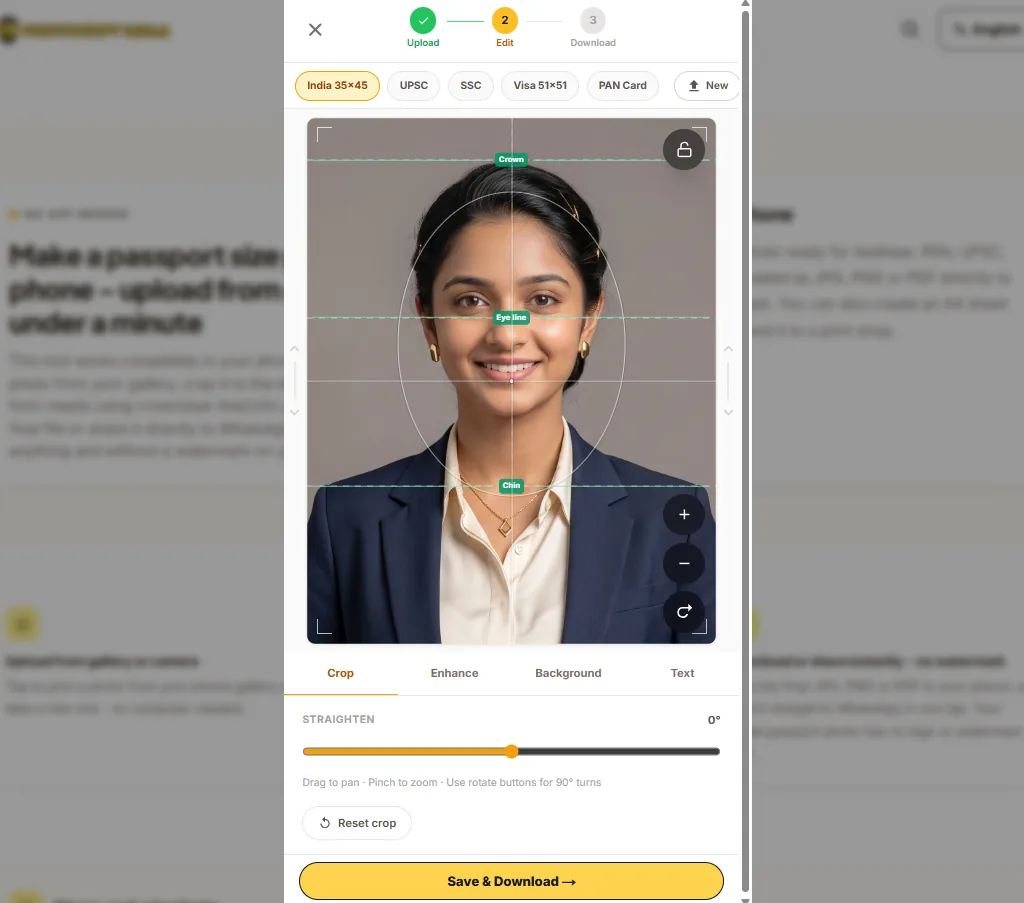
Pinch with two fingers to zoom and drag to centre the face, with crown, eye-line and chin guides so the framing matches passport rules.
Download or share instantly - no watermark
Save the final JPG, PNG or PDF to your phone, or send it straight to WhatsApp in one tap. Your single passport photo has no logo or watermark on it.
How to make a passport size photo on your phone
How to create a passport photo right on your phone
You do not need a computer or an app. This entire process works inside your phone browser. Here is how to go from a gallery photo to a downloadable passport size photo in under a minute.
Step 1 - Open in your browser
Open this page in Chrome, Safari, Firefox or any modern browser on your Android phone or iPhone. No installation needed.
Step 2 - Upload from gallery
Tap the upload area and choose "Gallery" or "Files" - pick a clear front-facing photo from your phone storage.
Step 3 - Pick passport size
Select 35×45mm for many Indian form-photo workflows such as PAN, UPSC, school and job files. Switch to 51×51mm only if your form specifies a square photo.
Step 4 - Crop using touch and guide lines
Use two fingers to pinch and zoom. Drag to position the face in the centre using the crown, eye-line and chin guides so the framing matches passport rules.
Step 5 - Download or share
Tap Download to save JPG, PNG or PDF to your phone - no watermark on your photo. Or tap the share icon to send directly to WhatsApp.
Tip: Use the rear camera for a better photo
The front selfie camera on most phones produces a lower-resolution image. For the best quality passport photo, use the rear camera in portrait mode or with a timer - stand against a plain white or light wall in natural daylight.
Getting a good passport photo from your phone
Getting the best result from your mobile camera
Before you take the photo
- Use a plain white or light-coloured wall or door as the background.
- Stand in a well-lit room near a window - avoid overhead bulbs that create shadows on your face.
- Look straight into the camera lens, not the screen preview.
- Keep a neutral expression with your mouth closed - no smiling, glasses or head covering (unless for religious reasons).
- Use the rear camera and tap on your face before shooting so the autofocus locks correctly.
Converting an existing image on your phone
If you already have a usable photo saved in your gallery - a recent front-facing shot or a previous ID photo - you can convert it directly to passport size without taking a new one. Upload it here, crop to the required size, and download. The tool handles the resize and aspect ratio automatically.
Note for portal uploads
Government portals each have their own rules for background colour, file format, pixel dimensions and KB limit. After making the photo here, always verify the portal's current instructions. Use the compress tool on this site if the file is too large.
Mobile Passport Photos Explained
Everything you need to know about making official photos on your phone.
Specially Built for Students and Mobile Form Filling
Most people in India search for a passport size photo maker when they are in the middle of filling out an admission, exam, or job form-and most of those searches happen on a smartphone.
We built this mobile-specific version so students and mobile users can complete their work without ever needing to visit a cyber cafe or open a desktop computer. If you just need a digital passport photo to upload to a portal or share via WhatsApp, this tool handles it entirely within your mobile browser.
Mobile Uploads vs. Desktop Printing
Our tools are designed for specific needs so you always get the best experience:
This Mobile Tool
Optimized for touch screens. Perfect for when you need a single digital photo to upload to a mobile form or share via WhatsApp. It is fast, lightweight, and focuses on getting you the right file size quickly.
Our Desktop Tool
Optimized for larger screens and cyber cafes. Perfect for when you need to prepare an A4 sheet for printing, add Name and Date text, or perform advanced background edits.
Why use a dedicated passport photo tool instead of a general photo editor?
General-purpose editing apps are excellent for creative work, but they weren't designed around the specific rules that Indian forms and portals check for - exact millimetre dimensions, correct aspect ratio, a plain background, and often a strict KB file-size limit. Getting any one of these wrong can mean a rejected upload or a wasted print. This tool is purpose-built for that single job, so the guesswork is removed.
| Feature | This tool | General photo/video editing apps | Other passport photo apps |
|---|---|---|---|
| Built for passport/ID photo compliance (crop guides, exact mm sizes) | ✓ | ✗ | sometimes |
| Works without installing an app | ✓ | partial (some are web too) | ✗ |
| No signup or login required | ✓ | usually | often needs account |
| No watermark on your downloaded photo | ✓ | usually | often paid to remove |
| AI background removal included free | ✓ | paid feature | often paid |
| A4 sheet with multiple copies for print shops | ✓ | ✗ | rare |
| Photo processed on your device, not uploaded anywhere | ✓ | varies | varies |
General-purpose photo and video editing apps are great for creative edits, but they aren't built around passport/ID document rules - correct mm size, aspect ratio, print-ready sheets and portal file-size limits. This tool is purpose-built for that one job.
Convert any image or existing photo to passport size on phone
A common need is converting an image already saved on your phone - not necessarily a fresh photo - into a correctly-sized passport photo. This works the same way: tap Upload, choose the image from your gallery or files, select 35×45mm (or another preset), adjust the crop and download. The tool handles the resize, aspect ratio and output format automatically. You do not need editing software or a desktop computer.
This is useful when you have an older ID photo, a professional headshot, or a photo taken at a studio that you want to reuse for a new form - simply convert it to the right size on your phone in seconds.
What is the passport size photo size? - dimensions and ratios
The standard passport size photo in India is 35mm × 45mm (3.5cm × 4.5cm). The aspect ratio is 7:9 (width to height). In pixels, this is often given as 350×450 pixels for standard uploads or 630×810 pixels for high-resolution forms.
| Form / Use case | Physical size | Common pixel size |
|---|---|---|
| PAN, UPSC, school, job and many Indian form workflows | 35 × 45 mm | 350×450 or 630×810 px |
| Square forms, some state portals | 51 × 51 mm | 600 × 600 px |
| US / international passport | 51 × 51 mm (2×2 inch) | 600 × 600 px |
Always verify the exact size, pixels and KB limit on the official portal or form before uploading.
Send passport photo to a print shop from your phone
Once you have made the passport size photo, you can create an A4 sheet with 6 or more copies and send the PDF to your local photocopy or print shop via WhatsApp. The shop prints it at actual size - no resizing needed. This saves a trip to a studio and works for school, office, exam, and ID form needs.
Switch to the full desktop version
This page is optimised for phone and tablet users. If you are on a laptop or desktop computer, the full passport size photo maker has additional layout options for advanced use.
Related passport photo tools - all work on mobile
Each tool below opens in your phone browser - no app needed for any of them.
Frequently Asked Questions
Common questions about using the mobile tool.
Can I make a passport size photo on my mobile phone?
Yes. Open this page on your phone browser - Chrome, Safari or any browser works. Upload a photo from your gallery, crop it to 35×45mm and download the result as JPG, PNG or PDF. Everything runs in the browser, so your photo never leaves your phone.
Do I need to download any app to make a passport size photo?
No. This is a browser-based tool. You do not need to download or install any app from the Play Store or App Store. Open the link in your phone browser and it works just like a native app - with touch zoom, pinch-to-crop and one-tap download.
Is this different from making a passport photo in a general photo editing app?
Yes. General-purpose photo and video editing apps are useful for creative edits, but they do not guide you through exact document-photo sizes, face framing, white-background checks, or A4 print sheets. This tool is built specifically for passport and Indian form-photo sizing, so you do not have to guess the crop or measurements yourself.
Does this tool add a watermark to my passport photo?
No. The single passport photo you download (JPG, PNG or PDF) has no logo or watermark on it, so it's safe to submit to any government portal or form. The optional printable A4 sheet includes a small text credit line at the bottom of the page - this does not appear on the individual photo itself.
How do I make a passport size photo from my gallery on my phone?
Tap the upload button on the tool, then choose the photo from your gallery or files app. The tool will load your image, let you crop it to passport size using touch gestures, then you can download the result directly to your phone storage.
How do I convert an image to passport size photo on my phone?
Upload any image from your phone - a gallery photo, a downloaded image or a camera shot. Select the 35×45mm preset (or whichever size your form requires), adjust the crop so the face is centred, and tap Download. That is all it takes to convert an image to passport size on your phone.
What is the passport size photo size in mm and pixels?
The standard Indian passport size photo is 35mm × 45mm (3.5cm × 4.5cm). In pixels, this is usually 350×450 pixels or 630×810 pixels for higher-resolution portal uploads. Some forms ask for 51×51mm (square format). Always check the exact requirement on the form or portal before uploading - this tool supports all common Indian sizes.
Can I take a passport photo with my phone selfie camera and use it here?
Yes, but a few things will make the result much better. Use the rear camera instead of the front selfie camera when possible - it produces a sharper image. Stand about arm's length away from a plain white wall, in good natural light, and look directly at the camera without tilting your head. Avoid heavy filters. Once taken, upload the photo here and crop it to the exact passport size.
How do I download the passport size photo to my phone?
After cropping, tap the Download button and choose JPG, PNG or PDF. The file will save to your phone's default Downloads folder or Photos gallery, depending on your phone and browser. On Android, check the Downloads folder. On iPhone, the file opens in a new tab - tap and hold the image to save it to your Photos app.
Can I share the passport photo directly to WhatsApp from my phone?
Yes. After downloading or exporting the photo, use the Share button in the tool which opens the WhatsApp share option directly on mobile. Alternatively, save the photo first and then attach it from WhatsApp when sharing with a print shop or family member.
What photo format should I use when uploading from my phone to a government portal?
Most Indian government portals accept JPG (JPEG) format for passport size photos. Download the JPG version from this tool. If the portal specifies a KB limit - such as 20KB, 50KB or 100KB - use the Compress Photo tool after downloading to reduce file size. Avoid PNG for portals unless the instructions specifically ask for it, as PNG files are usually larger.
My passport photo looks blurry on my phone - what should I do?
Blurry results usually come from a low-resolution source photo. Try these fixes: use the rear camera (not the selfie camera), stand in better light, hold the phone steady while shooting, and avoid zooming in digitally. If your photo is already saved, check that it was not heavily compressed before sharing. Upload the highest quality version you have.
How do I reduce the passport photo file size to meet a KB limit on my phone?
After making the passport size photo here, open the Compress Photo to KB tool on the same site. Upload the downloaded photo and choose the target size - 20KB, 50KB or 100KB. This works on mobile the same way - no app needed. Then upload the compressed file to the portal.
Does this tool work on tablets and iPads?
Yes. The tool is fully touch-enabled and works on Android tablets, iPads, and any tablet with a modern browser. The layout adapts to the screen size. You can pinch to zoom, drag to pan, and download or share the final file the same way as on a phone.
Can I make an A4 passport photo sheet from my phone to send to a print shop?
Yes. After cropping the photo, use the A4 sheet option in the tool to arrange 6 or more passport-size copies on a single A4 page. Download the PDF or JPG sheet and send it to your local print shop via WhatsApp - they can print it at actual size for cutting.
I heard Aadhaar needs a passport size photo - can I prepare one on my phone?
For normal Aadhaar enrolment or photo update, the photo is usually captured at the enrolment/update centre, not uploaded by you. Use this tool only when a separate paper form, school file, job file or local document workflow specifically asks you to attach a passport-size photo.
Is my photo data safe and private when I use this tool?
Yes. Your photo is processed entirely in your phone's browser using on-device code - it is not uploaded to any server for cropping, background removal or download. Nothing is stored unless you choose to download or share it yourself.
Conversion Step
Need help preparing this file?
If your photo, signature, PDF, or document is still not accepted on a portal, contact us. We can help prepare the final file online.
We do not ask for OTP, passwords, Aadhaar login, MPOnline login or any government portal credentials.