
Quick answer
Key takeaways
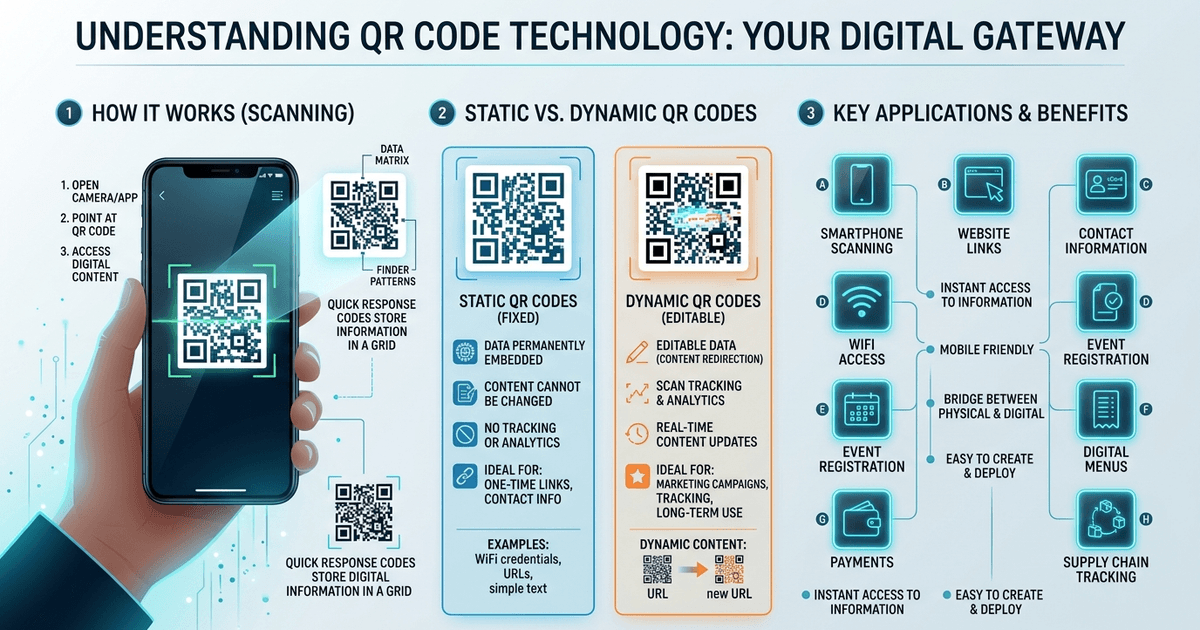
- Static QR codes embed data permanently; dynamic QR codes use a redirect URL for editability.
- Content types include URL, text, Wi‑Fi, vCard, email, SMS, phone, social, and payment links.
- Dynamic QR codes enable tracking and later updates, useful for marketing campaigns.
Static vs Dynamic QR codes
A **static QR code** stores the data directly inside the pattern; the information cannot be changed after the code is printed. This makes static codes ideal for one‑time uses such as a permanent link to a product page, a Wi‑Fi password that rarely changes, or a static event ticket.
A **dynamic QR code** points to a short redirect URL that you control. The destination can be edited later without re‑printing the code, and many services provide scan‑analytics (how many times it was scanned, geographic data, device type). The trade‑off is that the service usually requires an account and may place branding or limits on the free tier.
Content categories supported by the tool
Our QR Code Maker supports a range of content types, each with its own data fields:
- **URL / website link** - the most common use case, opens a web page.
- **Plain text** - encodes any short message.
- **Wi‑Fi credentials** - automatically connects a device to a network.
- **vCard contact card** - saves a contact directly into the phone.
- **Email, SMS, phone call** - pre‑fills a message or dialer.
- **Social media profile / app download** - links to a profile or app store page.
- **UPI / payment link** - (future) allows direct payment initiation.
Solve it now
Use the free QR Code Maker tool
The guide explains the problem. The tool helps you prepare the actual file online.
Create your QR code nowWhen to choose static vs dynamic
- Use **static** when the destination will never change, such as a permanent product URL, a static event flyer, or a Wi‑Fi network that rarely updates.
- Use **dynamic** for campaigns where you may need to change the landing page after printing (e.g., a promotion that rotates offers), or when you want to track scan performance for marketing ROI.
- For **high‑security** data like payment links, static codes avoid third‑party tracking, but dynamic services can provide additional fraud‑detection logs.
Practical checklist before you finish
Before you download or upload the final file, check the details that usually create rejection or rework: readability, file format, file size, spelling, page order and the exact instruction written on the form or portal.
For this task, use QR Code Maker as a preparation step, not as a replacement for the official requirement. If a school, office, employer, bank or government portal gives a size, format or document rule, follow that rule first and then use the tool to prepare the file.
- Open the downloaded file once and confirm it is not blank, cropped wrongly or unreadable.
- Use a clear file name so you can identify it later during upload or printing.
- Keep the original file until your submission, printout or sharing task is complete.
- Do not add private pages or unnecessary details when only selected information is required.
The most useful parts of this guide are Static vs Dynamic QR codes, Content categories supported by the tool, When to choose static vs dynamic. Read those sections carefully if you are preparing a file for an online form, local photocopy counter, office record or student document work.
Frequently Asked Questions People Search For
Read next
Related blog posts
These guides support the same document, photo, PDF or online-form workflow, so readers can solve the next step without returning to search.
How to Calculate Days Between Dates Online for Forms and Deadlines
Learn how to calculate days between dates, add days, subtract days and count working days for forms, exams, deadlines and office work.
Utility ToolsHow to Calculate GST Online for Bills and Invoices
Learn how to calculate GST online for bills and invoices. Add GST, remove GST, split CGST/SGST or IGST and understand taxable value.
Utility ToolsHow to Calculate Loan EMI Online for Home, Car and Personal Loan
Learn how to calculate loan EMI online for home loan, car loan, personal loan, education loan and business loan with interest and repayment schedule.
Utility ToolsHow to Calculate Percentage Online for Marks, Discount, GST and Profit
Learn how to calculate percentage online for student marks, discount, GST-style amount, reverse percentage, profit/loss, price change and daily shop work.
Written by
Shrikant Yadav
Website Developer, Photocopywala
Shrikant Yadav writes practical Photocopywala guides for photo tools, PDF tools, document preparation, printable resources, government-link safety and online form help for Indian students, job seekers, shop owners and everyday users.
Solve it now
Use the free QR Code Maker tool
The guide explains the problem. The tool helps you prepare the actual file online.
Create your QR code now